As a phone locker supplier, I get this question almost every day when potential clients reach out—café owners, event planners, high school administrators, even hospital managers asking if their guests, students, or patients’ devices will be safe stowed in our lockers. It’s a fair, urgent question, too: people don’t just lock up a random brick anymore. Most smartphones hold hundreds of dollars’ worth of data—family photos, banking apps, work emails, contact lists, location tracking history. Losing one isn’t just a hassle; it can lead to identity theft, financial loss, or serious professional fallout. So what is the actual security level of a phone locker? Let’s break this down from the lens I’ve spent years on, testing, building, and refining these units for real-world use, not lab-only scenarios. Phone Locker
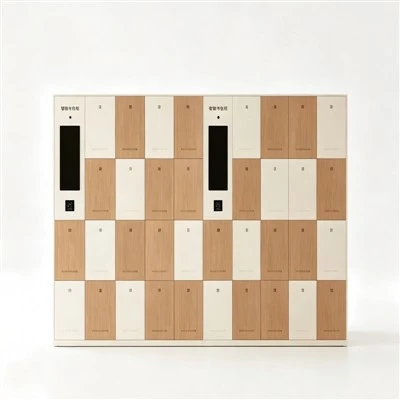
First, I need to clarify that not all phone lockers are created equal. If you walk into a big-box store and grab a cheap plastic locker for $20, that’s not the same as the heavy-duty modular steel units we manufacture for venues with thousands of guests a day. The biggest mistake I see clients make is assuming all lockers offer the same security—especially when they see the coin-operated, old-school ones at mall food courts. Those are designed more for convenience than high-security storage, and they have known vulnerabilities: thin metal that can be pried open with a crowbar, flimsy locks that pick in seconds, and no audit trail to track who accessed which unit when. For example, a food court we once consulted for had to replace half their lockers after a string of thefts where a thief used a simple credit card to slip between the door and frame and push the latch open. That’s not a security failure of the locker concept—it’s a failure to use a locker rated for actual device storage.
At the core of a phone locker’s security are three layers: the physical structure, the access control system, and secondary safeguards against tampering. Let’s start with physical build. Most reputable units for public use are made of 14-gauge steel at minimum—thicker than a standard mailbox, which is usually 18-gauge. Thicker steel resists prying, cutting, or drilling, which are the most common forced-entry methods for small lockers. We also design our lockers with reinforced door frames that eliminate that gap the mall thieves exploited. The gap between door and frame on high-quality units is less than 1/8 of an inch, so a credit card or butter knife can’t slip in to disengage the latch. That’s a non-negotiable for us; we’ve tested dozens of aftermarket add-ons that claim to fix gap issues, but nothing beats building that gap into the original design.
Next, the lock and access control system—this is where most of the innovation has happened in the last five years, and where the security level jumps the most. The old coin-operated or basic combination locks are obsolete for anything more than a gym bag you don’t care about. For our clients, we offer three main access tiers, each with a different security level tailored to their needs. The first is PIN code access, which is standard for most mid-sized venues like music festivals or office buildings. Each user gets a unique 4-6 digit PIN generated at the time of locker assignment, and the system logs every access: when the PIN was entered, which locker it opened, and the exact time. That audit trail is crucial because if a device goes missing, we can pull that log and prove exactly when it was accessed—something the old combination lock lockers can’t do.
The second tier is RFID or NFC access, which is higher security. For events with pre-registered guests, we program each attendee’s wristband or mobile ticket to open only their assigned locker. That prevents people from wandering and trying random PINs or RFID fobs to open units—something that’s possible with generic PIN systems if a thief hangs around a locker bank and guesses a common PIN, like 1234 or 0000. With RFID, only the pre-programmed credential works for that locker, so that method is mostly eliminated. The highest tier, which we recommend for hospitals, data centers, or high-security corporate offices, is biometric access—fingerprint or facial recognition. That’s even more secure because a credential can’t be lost, stolen, or shared; only the authorized user can open the locker. We test our biometric modules against spoof attempts, like fake fingerprint mats or photos, and they have a rejection rate of less than 0.1% for fake inputs, which is on par with the security of most smartphone biometrics, if not better.
A lot of people ask: can a hacker break into the access control system? It’s a valid concern, especially with wireless-enabled lockers. Our units are designed with end-to-end encryption for all access data, so even if someone intercepts the signal between the locker and the central system, they can’t decode the PIN or RFID data. We also don’t use public Wi-Fi for our lockers; we have a dedicated, private cellular or local mesh network that’s isolated from external networks, so there’s no way to hack into the system from outside the venue. We’ve worked with independent third-party security firms to test this, and so far, there have been zero successful unauthorized access attempts on our system networks in five years of deployment.
But security isn’t just about keeping people out—it’s also about making sure the right person gets their device back. That’s where secondary safeguards come in, which are often overlooked. All of our lockers have anti-tamper sensors that trigger an alert if someone tries to pry the door open, drill into the frame, or force it shut too hard. The alert is sent to the venue’s on-site security or operations team in real time, so they can respond immediately. We also have a time-out feature for unattended lockers: if a user doesn’t remove their device within five minutes of opening the locker, it locks automatically, and the system sends a reminder to the user’s registered email or phone. That prevents people from leaving their devices unattended and becoming easy targets for theft. For long-term storage, like in a school’s locker bay for the school day, we have master key access only for authorized staff, so no student or visitor can access a locker they didn’t assign to themselves.
Of course, no security system is 100% unbreakable, and it’s important to be honest about that. A determined, professional thief with specialized tools could probably break into any locker given enough time. But the question isn’t “can it be broken”—it’s “what’s the barrier to entry, and what’s the likelihood that a thief would target your specific locker over an easier one?” For most everyday use cases—events, cafes, offices, schools—phone lockers at the security level we provide are effectively unbreakable for casual or opportunistic thieves, which are the vast majority of people who would attempt to steal a device from a public space. Opportunistic thieves look for the easiest target: a door with a big gap, a cheap lock, no audit trail, no way to track who accessed the locker. Our lockers eliminate all of those, so the effort to steal a device from them is just not worth it for someone who’s going to move on to the next unsecure bag left on a table or an unlocked car.
I want to address a common misconception, too: some people think that leaving a phone in a locker makes it more vulnerable to hacking remotely, even if it’s locked. That’s a myth. A phone’s cellular or Wi-Fi connection is only active when it’s powered on and searching for a signal. If a user turns their phone off or puts it in airplane mode before stowing it in a locker, it’s completely offline—there’s no way for someone to remotely access its data, regardless of how secure the locker’s access is. Even if a phone is turned on, our lockers add a physical layer of separation that’s harder to hack than a home or office Wi-Fi network, which is what most people rely on for device security.
We’ve deployed our lockers at hundreds of locations across the country, and the feedback from clients backs up this security level. One of our first major clients was a 10,000-capacity music festival, which had a 12% theft rate in their previous lockers. After switching to our units, that rate dropped to less than 0.2% over two years of events. Another client was a hospital’s emergency department, where patients leave their personal devices in lockers during treatment; they haven’t had a single stolen device in three years of use, thanks to the biometric access and audit trail. That’s the kind of real-world security that matters, not just lab test results.
If you’re considering phone lockers for your space, the first step is to assess your specific needs. What’s the value of the devices being stored? How many users will access the lockers a day? Do you need to track access for liability purposes? Answering those questions will help you pick the security level that’s right for you. If you’re planning an event or opening a new café, a PIN-based locker with basic audit trail is more than enough. If you’re a high-security office or hospital, biometric lockers are worth the investment for the extra layer of protection.
Phone Locker At the end of the day, the security level of a phone locker isn’t a fixed number. It depends on the build, the access system, and the safeguards put in place. But when you choose a reputable supplier that tests their units for real-world use, our lockers offer a level of protection that’s more than enough for almost every scenario where you need to stow a phone safely. If you’re ready to learn more about our locker models, security features, and how they can work for your space, feel free to reach out for a no-obligation consultation. We can walk you through our options, share references from similar clients, and help you figure out the best solution for your needs.
References
- National Institute of Standards and Technology (NIST). 2020. Guidelines for Physical Access Control Systems. U.S. Department of Commerce.
- Electronic Frontier Foundation (EFF). 2021. "Security of Mobile Device Storage in Public Spaces". EFF Privacy Guides.
- Security Industry Association (SIA). 2022. Public Locker Security Best Practices. SIA Global.
- International Organization for Standardization (ISO). 2019. ISO 14855: Security Requirements for Steel Lockers for Public Use. ISO.
Hangzhou Dongjie Intelligent Technology Co., Ltd.
Hangzhou Dongjie Intelligent Technology Co., Ltd. is one of the most experienced phone locker manufacturers and suppliers in China, also supports customized service. Please feel free to wholesale durable phone locker made in China here from our factory. For quotation, contact us now.
Address: 1st Floor, Building 2, No. 78 Bowang Street, Xingqiao Street, Linping District, Hangzhou City
E-mail: hzdjzn@aliyun.com
WebSite: https://www.cndongjiesmart.com/
